Categories
Daily Life

Mind Mapping

In the Marketing Over Coffee LinkedIn group MindMaps came up as a topic. We talked about it this week and I said that I’d share more than I normally show in my Quarterly Review posts.

Here’s a full screenshot (click it for full size) with my gory details removed:

Here’s a zipped file if you have MindManager, or an exported Word Doc.

The process is simple – at the beginning of the year think about what you will accomplish on four fronts:

  1. Family
  2. Personal
  3. Professional
  4. Financial Goals

You’ll probably find that you have many of these quadrants already full of items, and that’s fine, it’s good to be able to give yourself some credit for your dumptruck full of stress that you’ve been taking for granted.

Some notes:

Family – Remember that your life is juggling, but not all the balls are the same. Your family is one of the glass ones, you drop that and it will never be the same. It doesn’t have to take all your time, but it does need to be first in your planning.

Personal – Here’s your one shot to pick something fun to do. Fitness also sets here, you’ve only got one body so you need to plan for it to last a while.

Professional – This will be different for everyone, but my mix has been the current job, side projects, and keeping your personal brand strong.

Financial – After the sands of time have blown away nobody will care about a few thousand bucks, but you do need to put some food on the table today. If you’ve been using Quicken, it’s pretty easy to forecast this stuff.

So from here, you need to check in at least once a month, better yet have a day once a week (Sunday nights tend to work well), where you look at your upcoming calendar and make sure you’ve made time for the big stuff.

Every quarter, update the scorecard to see how things are going. If you’ve got anything big planned please tell me about it, I’m still trying to fill my 2011 card.

Categories
Daily Life

Man’s Best Friend

My blogging holiday is over, having hit my 52 post goal before Thanksgiving I’ve been playing around with a bunch of other projects including a new laptop (and workflow) for me, and dumping 28 tons of gravel into a half filled root cellar in the garage (but that’s another post).

The first day of the new year was not a happy one here. Carin’s dog Hannah had reached 15 years old and has not been doing well for a couple of years. She went deaf about 3 years ago, and had a tumor removed two years ago. As we were driving out to see our family on New Year’s Day, even with her in the way back of the car I could see that a small growth she had in her mouth had exploded.

We had been preparing for this for a long time but it’s still so sad when the day arrives. Carin got her as a puppy 5 years before we started dating, and I used to joke that she took care of her until I showed up.

I’ve had many dogs and she was by far the smartest. Many of them would get their toys when told to, but you could say “No, the Blue one” and she would go back for the right one. Sadly, she is survived by Carter, who walks into things all the time.

We miss her, but it’s good to know that she’s no longer in pain, but the house still feels kind of empty.

Categories
Productivity Booster

Using Your iPad as a Desk Clock

I have a set of logitech speakers that are vintage 2006. They are one of the first ones that came out and I got them after Adam Curry plugged them as he used them in his San Francisco apartment. They are still great, but only one downside, they don’t charge the current generation of iPod Touch. Since the H-Bomb uses it in his room we had to upgrade to something that would charge. I swapped it out with my XtremeMac Luna Alarm Clock – it charges, sounds great, and has a dimmer control – a great product.

Now I needed a new alarm clock so I took the Sony Dream Machine from the office. The bummer with that is that it’s at least 10 years old and the CD player doesn’t work anymore. Since I can only wake up to the buzzer I now have the XtremeMac Micro Dock on my Amazon Wish List.

As the dominoes continue to fall this means that I now no longer have a clock in the office. I didn’t think it would be a big deal, but after half a day I realized I needed to get one. I have a Griffin Loop and a Bluetooth keyboard for the iPad so I thought I could set that up and try a desk clock app.

After Googling and checking out the AppStore (btw if you are not using AppShopper you are missing out on a great tool to find stuff in the AppStore) I found 4 apps to test out:

My Frame – Tried to add pictures and it crashed on every 3rd or 4th one. At that point I got frustrated and deleted it.

myPhotoAlarm – Deleted all but 1 of the stock photos and I couldn’t add my own, again I gave up and deleted it. Update: Right after this was posted, Gregg responded and apologized for a bug that’s due to the 4.0.2 update. I will reinstall and see how the update arrives when the folks at Apple let it through. Points to Gregg for great customer service.

Lifelike Clock – Is one I have kept, it doesn’t have photo capability, but it does allow you to access your music library for alarms. This is a good one if you want your own alarm clock when you travel. It also includes weather.

Nightstand HD – Was my winner, it allows you to select your own photos (although there is a bug I’ve hit after 10 photos where I’ve added new ones and they don’t show up. It also has weather functionality. If it had the ability to hit my music library for alarms it would be the sole survivor.

I’m also playing the Christmas levels of Angry Birds, if you have any great apps please comment so I can check them out!

Categories
Daily Life

Mr. Rogers and Extreme Makeover Home Edition

As I clean out my inbox I have links worth sharing that finally come to light. I wrote about Mr. Rogers giving you the smackdown, and even though it was in 2007, the magic of the Google has kept it around and it was cited in a recent Fast Company article. Also interesting in my post is a comment with some kind words from a guy who was just beginning to really tear things up – Chris Brogan.

Over on Marketing Over Coffee we’ve released a special episode just for people who have bought the iTunes Marketing Over Coffee app (and folks that buy the Android app out probably later this week will also get it). The rest of the subscribers will get it the last week in December, but you faithful reader can also get it early since you go out of your way to check out this space.

MOC Interview with Sal Ferro and John Doyle of Alure Homes

[audio:http://traffic.libsyn.com/marketingovercoffee/MoC191-ehme.mp3]

Have a great Thanksgiving!

Categories
Daily Life

Video on the Web

Big News
I’ve been reading what I can about HTML 5 lately and came across this great resource on Video for the Web. It covers codecs, wrappers and a bunch of other stuff including H.264, a video standard that HTML 5 supports.

Lesser News
This was also computer overhaul week. Besides my upgrade, which is, for the most part, completed, I also juiced up the Lovely Carin’s Mac with 4x the RAM and more than doubled the hard drive and went up to 7200 RPM. It really screams now.

I also gave Handbreak a try for getting  some of my DVDs into iTunes so I can check them out on the iPad. the H.264 standard looks amazing. I’m glad I saved all my source DVD’s so I can replace the files I have now. I joined the new gym down the street so I’m looking forward to catching up on the TV and movies I have missed in the past year. I’m thinking about catching the last season of 24 since I’ve see the others. The BBC’s Sherlock is great but doesn’t take long to watch. Any other suggestions welcome…

Categories
Geek Stuff

My Last PC

I was hoping that this post would be about how much I love my new laptop. Both my old tower and laptop were both over 5 years old and I decided that portable hard drives now come in sizes large enough that I could consolidate to one machine.

The problem is that after dealing with so many viruses, spyware, malware, adware, corrupted registries, I’ve moved everyone else in the family to Macs. There were two things that made me think staying with a PC was the right thing to do:

  1. I use one for work and this way I could use one docking station in the office
  2. I’m already loaded on PC software so that factored into the price of everything

There are two things that have made me realize that this was a mistake:

  1. Migration – Moving from one Mac to another entails connecting them with a cable and coming back an hour later. Migrating from one PC to another has taken all of my personal time this week and will still take another 5 hours or so.
  2. Backups – The state of PC backups are a disgrace to the technology industry as a whole. Time Machine is the Mona Lisa, PC backups are a stick dipped in crap.

The migration thing doesn’t bother me too much, I know people who don’t go the transfer route because they want to reinstall apps for better performance so the only real pain point here for me was iTunes. I had to do a lot of hocus pocus to keep my playlists – transferring my library to an external drive then reimporting it on the new machine.

Backup is what kills me. I had used Ghost for years until I had a couple of machines where I would take an image, upgrade to a larger hard drive and the image wouldn’t run on the new drive. I tried Western Digital, they have some thing where they change the file system making it slow to browse for files. One day I plugged in a drive and something was wrong with the index for the file system. The 200 GB of data was on the drive, it just couldn’t make heads or tails of any of it and said the backup set was empty. From there I went to Acronis which worked very well but I tried to install it on a WinXP machine this week and the installer wouldn’t run. I’m not too interested in trusting my data to a company that can’t get the installer to work. It could well be a Windows issue, Firewall, Anti-Virus, the guy Tony down the street, hell if I know, it’s not like I get an error message or anything.

For the XP machine I had a previous version of Acronis on CD so I could at least take an image. The question was what to do with my new Win 7 machine. There’s both the Win 7 backup utility and the Lenovo Rescue and Recovery utility. I went with R&R because it prompted me and I had forgotten that there was backup in Win 7.

It spent about 10 minutes writing help files to a hidden partition. I already have one image on a extra partition, why do I need a second one? Why would one partition be hidden and the other one not? Why bother giving an estimated time left for the help files and then have it say 0 minutes remaining for 2 hours as it writes files to my USB drive? Seeing as Adobe CS5 help files load in less than 10 minutes why does a restore program need 10 minutes? Why didn’t it ask me which drive I wanted? How am I going to know which directories are the backup and which are the folders I already on the drive? Can I have more than one backup drive? Why do I feel like this backup plan is about as safe as a parachute covered in gravy thrown in a basement full of rats for 3 months? Why do I bother asking these questions when I know that the answers don’t matter, if I had a Mac I’d click on Time Machine and be done?

The worst part is that it’s all about time. I could have spent time writing, talking to my family, doing some productive work. My fear of the pain of switching platforms boomeranged right back at me, I should have been more worried about the pain of staying on the same one.

Categories
Photos

What Point and Shoot Camera Should I Buy?

A friend asked me this question today and I went through the trouble of putting together the (affiliate) links so I thought this would make a decent blog post for the holiday season. This is not a discussion, but rather I was asked what I would buy for a point and shoot and this is it:

Canon PowerShot SX210IS 14.1 MP Digital Camera with 14x Wide Angle Optical Image Stabilized Zoom and 3.0-Inch LCD

This camera is a little bigger than the average point and shoot but it takes incredible pictures. It has a great lens with huge zoom, and can shoot HD video. It’s Ronin approved.

Don’t make the mistake of buying just the camera, if you are giving a gift you want to include the whole set:

A case so it doesn’t get destroyed, an extra battery so you can always have one charged and ready, and a SanDisk 8GB fast memory card – not a cheap knock off stolen out of the SanDisk defect pile.

So that’s a great package for about $350 all in. From there you could go in three directions:

  1. Smaller if carrying it around is the primary concern
  2. DSLR for fantastic pictures but you’ll have to carry around a bag of junk
  3. Up or down if you have a price number to hit

For smaller I’d check out the digital Elph line from Canon, the PowerShot SD4000 IS is around $280 and a great camera.

You can check out and compare the whole Canon Line here.

For DSLR the Rebel T2i is the latest entry level and around $700, plus you’d have to kick in another $300 for a good lens. Expensive and a lot to carry, but great shots.

You can go more expensive on point and shoot but I don’t think it’s worth going over $350. You can get cheaper if you got a model that you can still get new but has been out for a while, like the Canon PowerShot SD940IS for $165.

Amazon is good especially if you have free shipping with Prime, but also and check prices at B&H Photo and go there if you ever have the chance when you are in New York City, it’s right near Madison Square Garden.

Categories
Direct Mail

The Problem with Direct Mail

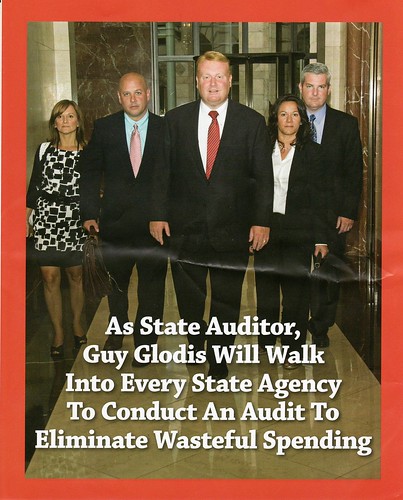
Many moons ago I worked on direct mail pieces. It’s an arcane practice requiring many of the things you hear about at Halloween – eye of newt and the like, and it is far more difficult than it would seem. Sadly, during the primaries here in Massachusetts I had some examples of the challenge. Guy is a fellow UMass grad and I received two portfolio pieces from him (8 1/2 x 17 so it folds into a 4 page brochure). Here’s the first one: Bonus points to you if you can catch the problem here. Look for a second to see if you get it. I ran this by a number of marketing people and few caught the error.

Reign has a homophone – rein (homophones sound alike but have different meaning whether they are spelled the same or not, in this case not). To make things even more confusing I thought this was a homonym, but while fact checking found than homonyms are also spelled the same (e.g. bear – the animal, vs. bear – to carry). After even further review I found that some use homophone and homonym interchangeably, perhaps because I am one of the 4 people left on earth that care.

But alas, if you do know the difference, it’s a huge one: Rein, the word that should have been used, comes from leading a horse and means to control – in this case stop the waste – a great message. Reign refers to the rule of a leader, most commonly referring to a monarch’s rule – so instead of eliminating wasteful spending this says he will be King  Wasteful the Great. Again, I ran this by a number of marketing professionals and they didn’t catch it – the point is: copy writing is challenging stuff and good editors are rare diamonds.

Here’s the second one:

This is the one that broke my heart completely. A cynic would say “Yes, that’s what I expect the auditor to do, that’s their job.”, but I love this ad. They look bad ass. Joe Schlump sleeping at his desk in some no show job at the State House would get run out of town by these guys. The other 3 pages were strong too, comparing him to his opponent, and doing a great job of it.

The problem here is that trying hit targets in the postal system is Jedi Master Level only. There are SCFs (Sectional Center Facilities) and a bunch of other crap I don’t even remember anymore that the mail moves through that affect delivery. Plus, every postmaster has to put all the rules and regulations in practice just like a Chief of Police – so every town is different. The postal system got the best of this one – when it arrived in my mailbox I had voted on election day, the day before.

Categories
Daily Life

Emergency Plumbing, etc.

Not much writing about marketing lately, I know… contrary to the title of this blog. But hey, you can always swing over to Marketing Over Coffee to get my take there.

I wanted to thank the folks at Suffolk U. who invited me to stop by on Saturday to talk about social media, I hope they enjoyed it as much as I did. It also gave me an excuse to bring the camera downtown for some shooting.

My weekend was a bit messed up while I was getting the house ready for winter and found out that the bleeder valve in the shutoff for the hose spigot was mounted backwards. If you don’t speak plumbing just picture me standing in my basement in socks, jeans and a rugby shirt with water spraying out in a 6 foot jet all over everything. One shutoff and a walk to the downtown hardware store for a $3.50 part and all was back to normal.

Last weekend was a big deal for me. Comic Con came to Boston with a bunch of TV stars from back when I used to have time to watch TV. It’s been decades since I’ve gone to a con but I really wanted to meet Lee Majors. My entire life has been messing around with technology, and when you rewind the tape to the beginning there’s a kid getting his mind blown by an engineer making a bionic man. I figured it would be perfectly normal for a geek, a shadowy government dude and an astronaut to save the world every week. For those who missed the seventies I’m talking about Col. Steve Austin – The Six Million Dollar Man.

I also got to meet a guy you might know from Smallville or The Dukes of Hazzard:

It was great to talk with John, he saw my camera and brought me over to talk to the neighboring booth who was having trouble with theirs. After I got the flash going for them the let me take a special shot on the house:

It’s hard not to yell “YEEE HEEE HAAAAAWWW” when you are sitting in it. Also – everyone asks the same question – no, I did not have to climb in, the door does open.

Last, but not least, this week was Blogtoberfest, Jenny calling down the Martini Thunder yet again. I got a nice shot with the Sony NEX-5 with our own Paul Revere of Video Blogging:

Ok, last shot of my stupid grinning mug: this is my favorite shot of Blogtoberfest (I’m not sure if that link works, of course FB has no sharing URL, so I imagine they’ll sabotage a deep link). Flickr has it, so here it is, Ye Olde Bostone Bloggerse:

I know it’s last minute but if you are looking for a 5k Sunday morning I’ll be doing the Miles for Kyle. Have a good weekend!

Categories
Daily Life

Where do you put extra hope?

I am a city person at heart. I like being around a lot of people, when I am downtown during the evenings I can feel the energy of everyone traveling around, each of them with their own story being played out. I get a bit of the same feeling first thing in the morning when I log on and see people from the west coast still posting things in their late night that gets handed off to my early morning, real time. At that point the web joins the ranks of the cities that never sleep.

I saw a flash of truth this morning as opposed to the normal “Gee, I forgot how much I like pickles” kind of crap. Someone mentioned the quiet lonely hours before going off to sleep. I remember, in what seems to be about 2 million years ago, feeling the same way going to bed at some hour when the people who run bakeries and coffee shops are opening up for the morning rush.

It was so well written, not only was it poetic, but it felt like the scene at the beginning of a movie. Like the “I wish” part at the beginning of every Disney movie ever made. The sad part was that it was deleted very quickly. This person is “a big deal on the internet”, but actually is one of the few that really is a big deal on the internet, so I’m sure that when something like that is put out there,  there’s a whole parade of pickle liking weirdos that come pouring in.

So, feeling fortunate enough to have seen something real this morning, and having no way to send back a bit of hope, I thought I’d store it here. I’m living proof that a prayer for a busy home can be answered. Although I don’t always get a full night sleep, I am happy in my bed.